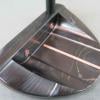
November 8, 201510 yr Saw this on eBay. Always wanted a 85029 model, but the bottom of this putter looks wrong, not to mention copper is misspelled. What do you guys think? http://www.ebay.com/itm/Putter-Yamada-Linkshand-lefthand-/161875644952?hash=item25b08a5218:g:ok4AAOSwYHxWNcjY
November 8, 201510 yr Unless he did a lefty totally different from the righty, doesn't look anything like mine or others I've seen.
November 9, 201510 yr Must have been having a nice hot cup off tea in the process. Hope it burnt his mouth ;)
November 9, 201510 yr It look abit wrong I have to say, my is burning copper also, maybe different Charcoal :P and the fonts looks so different......
November 9, 201510 yr Author Yes, I emailed the guy selling it and told him my thoughts. He responded appropriately and said he was going to pull it from eBay.
November 10, 201510 yr Yes, I emailed the guy selling it and told him my thoughts. He responded appropriately and said he was going to pull it from eBay. Until he joins the tops of the U ? lol.




Join the conversation
You can post now and register later. If you have an account, sign in now to post with your account.